Notifications

Dynamic Island Notifications

Notifications

Dynamic Island Notifiactions

Overview

Overview

DynamicLake offers an enhanced Notifications feature, designed to keep you seamlessly connected and responsive across various messaging platforms with Dynamic Island style.

This feature ensures you never miss important updates, messages, or alerts, no matter what you're doing

Quick Reply

Quick Reply

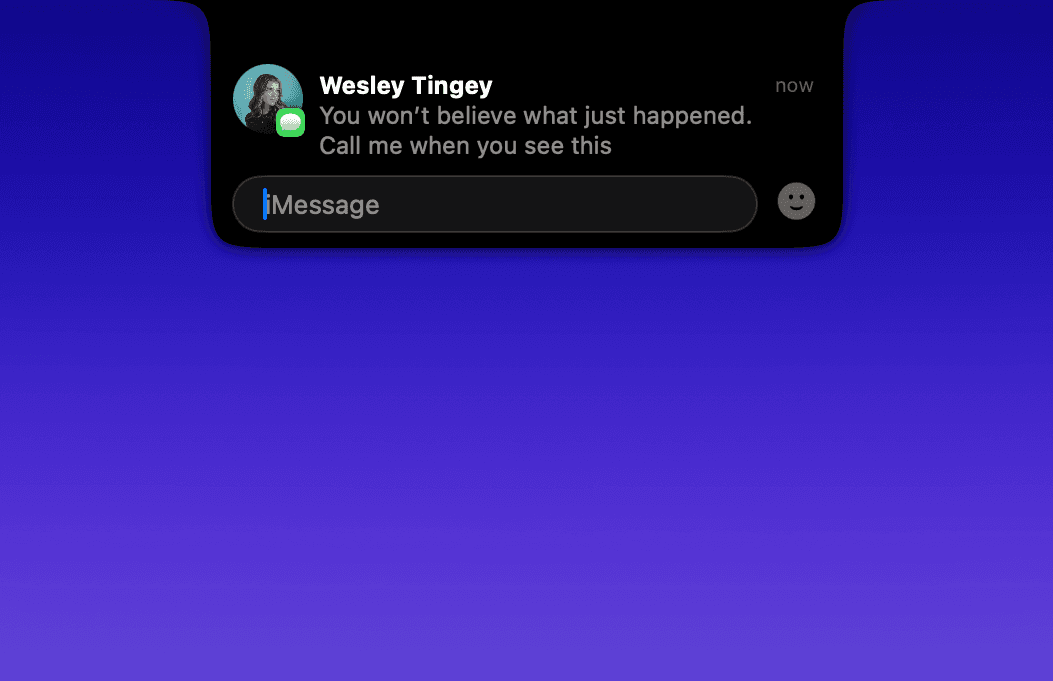
Quick Reply feature, enabling you to respond instantly and efficiently to messages across various platforms. This feature ensures that you can keep up with conversations and notifications without interruption, no matter what you're doing
Quick Reply

Quick Reply

Reply instantly without switching apps. Stay focused and respond directly from your notification

Multiple Messages

View and manage multiple conversations at once in a clean, distraction-free layout

Voice Messages

Play voice messages directly from your notification without ever opening the full app

Emoji Reactions

React instantly with a single tap and keep conversations flowing naturally

Quick Reply

Quick Reply

Reply instantly without switching apps. Stay focused and respond directly from your notification

Multiple Messages

View and manage multiple conversations at once in a clean, distraction-free layout

Voice Messages

Play voice messages directly from your notification without ever opening the full app

Emoji Reactions

React instantly with a single tap and keep conversations flowing naturally

Quick Reply

Quick Reply

Reply instantly without switching apps. Stay focused and respond directly from your notification

Multiple Messages

View and manage multiple conversations at once in a clean, distraction-free layout

Voice Messages

Play voice messages directly from your notification without ever opening the full app

Emoji Reactions

React instantly with a single tap and keep conversations flowing naturally


Messages / iMessage

Message Preview, Voice Messages ,Quick Reply, Attachments Support

FaceTime

Audio/Video support, iPhone calls on your MacBook

Email

Email Preview
*The app must run in the background

WhatsApp

Message Preview, Quick Reply, Voice Messages

Telegram

Message Preview, Voice Messages, Quick Reply, Attachments Support

Slack

Message Preview, Quick Reply

Messages / iMessage

Message Preview, Voice Messages ,Quick Reply, Attachments Support

FaceTime

Audio/Video support, iPhone calls on your MacBook

Email

Email Preview
*The app must run in the background

WhatsApp

Message Preview, Quick Reply, Voice Messages

Telegram

Message Preview, Voice Messages, Quick Reply, Attachments Support

Slack

Message Preview, Quick Reply

FAQ

Which app support calls?

Which app support messages?

What are Join meeting Calls

Which join meeting calls does DynamicLake support?

*System updates or changes in third-party apps (like WhatsApp, Telegram, macOS updates etc) may occasionally disrupt our reliable Push Notifications and Quick Reply features